Windows desktop terminal

Every market on one screen.
One click to take a side.

FIRE is an execution terminal for short duration event contracts. It puts the index price, the level you have to beat and both sides of the book in front of you, and it sends the order the moment you decide. It does not tell you what to trade.

14 day trial. No card required to start. Demo mode is free forever and needs no exchange account.

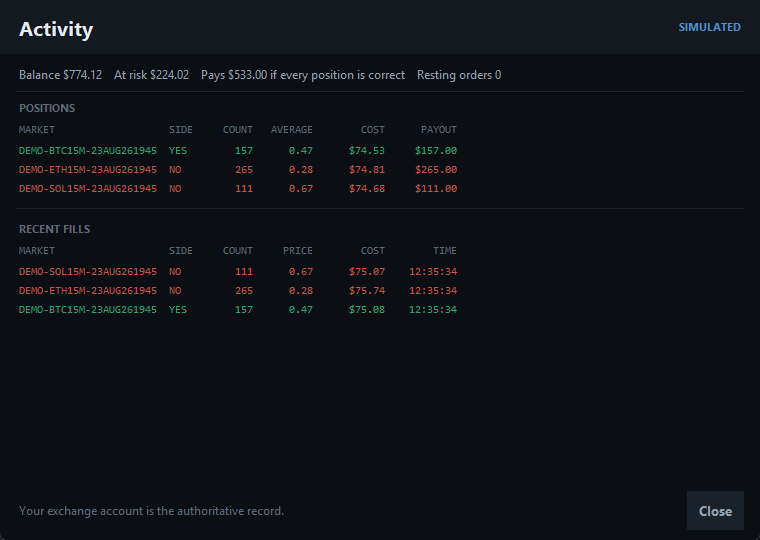
The FIRE terminal showing ten crypto markets with index price, strike, book prices and one click buy buttons
FIRE in demo mode. Ten markets, live book, positions on the card.
What FIRE is

A fast hand on the trigger, not an opinion

Short duration contracts settle in minutes. By the time you have tabbed between a chart, a book and an order form, the window you were looking at has already moved. FIRE collapses that into one screen and one click.

What FIRE does

  • Shows every open market at once, with the index price and the level it has to finish past.
  • Reads the book and prices your order from what is actually there, not from a guess.
  • Sends immediate or cancel orders, so nothing you click sits resting on a book you have stopped watching.
  • Refuses any order whose worst case loss is bigger than the ceiling you set.
  • Keeps your positions and fills in one place.

What FIRE does not do

  • It does not tell you what to buy. There are no signals, no alerts, no scores and no recommendations.
  • It does not trade on your behalf. Nothing is sent that you did not click.
  • It does not hold your money. Your account stays at your exchange and we never touch it.
  • It does not promise you a profit. Nobody honest can.
  • It is not a broker, a dealer, or an adviser.
Who it is for. People already trading short duration event contracts who are losing money to their own execution: the mistyped size, the order that filled twenty cents worse than the screen said, the window that closed while they were still clicking. If you are looking for something to tell you what to trade, FIRE is the wrong product.
Features

Built for the ninety seconds that matter

Index and target together

Where the market is, and what it has to finish past, on the same card with the gap between them worked out for you.

Priced off the real book

Enter a dollar amount. FIRE walks the visible depth and sends a count that cannot cost more than you typed.

A ceiling that actually holds

Set a maximum loss as a share of your balance. Every order is checked against it before it leaves your machine.

Immediate or cancel

Orders fill against what is there now or they do not fill at all. Nothing is left resting after you have moved on.

Positions and fills

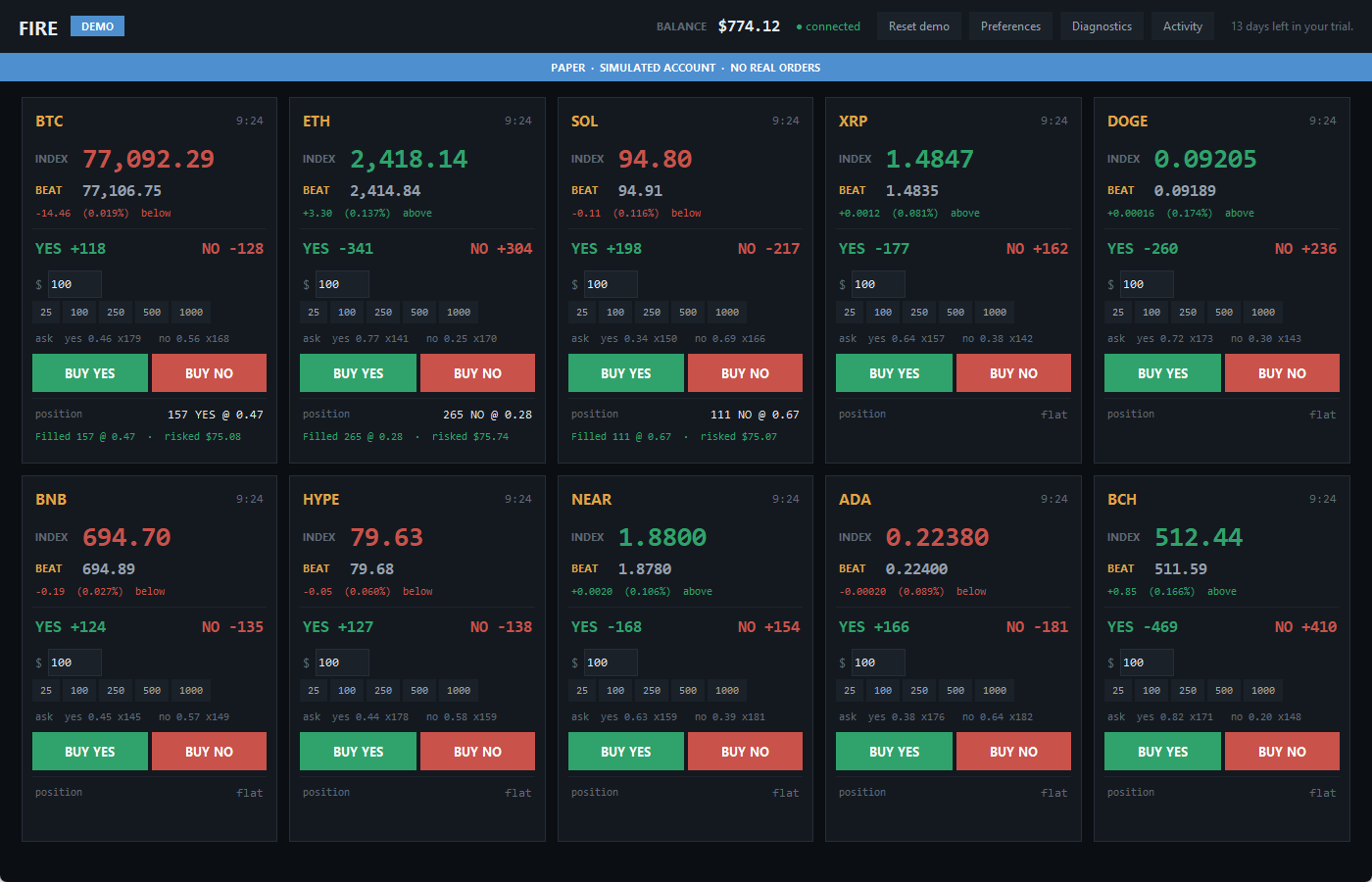
What you hold, what it cost and what it pays if it comes in, next to each other, with the fill history underneath.

Honest status

Connection, subscription and mode are on screen at all times. When something is wrong FIRE says so in plain words.

The FIRE activity window listing open positions with cost and payout, and a list of recent fills
Cost and payout side by side, because that is the whole shape of a binary contract.
Demo and live

Two modes that cannot be confused for each other

This is not a toggle around the same code. Demo and live are separate implementations. The demo half of FIRE contains no networking code at all, so a demo order has nowhere to go even if something goes wrong.

Demo

Simulated markets, a simulated balance and simulated fills. No exchange account, no API key, no money. Free forever, and a blue banner across the top says PAPER the whole time you are in it.

Live

Your own exchange account, your own API key, real orders. A red banner says LIVE and FIRE asks you to confirm before each order until you turn that off yourself.

FIRE never moves you from live to demo on its own. If your subscription lapses it stops sending orders and tells you why. It does not quietly swap your real balance for a simulated one while you have positions open.
Security

Your key stays on your computer

We never receive your API key

It is encrypted with your operating system's own secret store, which ties it to your Windows sign in. Orders are signed on your machine. We do not have your key and cannot recover it for you.

Nothing ships with credentials

The download contains no keys, no tokens and no accounts. It connects to nothing until you supply your own key, and the build is checked automatically before every release.

Support files are scrubbed

Diagnostics writes a support bundle with key material removed before anything reaches the disk. If FIRE cannot verify a bundle is clean it throws it away rather than saving it.

You can revoke us in one click

Remove the saved key from Preferences at any time, and revoke it at your exchange. FIRE ships with written instructions for rotating a key and for what to do if your laptop is lost.

We will never ask you for your private key. Not by email, not in a support ticket, not on a screen share. Nobody needs it to help you.
Pricing

One product, one price

No tiers, no feature gates, no per order fees. Everything FIRE does is in every subscription.

$59 / month
  • Every feature, no limits
  • Up to 3 computers
  • Free updates while subscribed
  • Cancel any time, in one click
Start free trial
Founding members. The first 50 subscribers pay $39 a month, or $390 a year, and keep that price for as long as the subscription stays active. In exchange we would like to hear from you when something is wrong.

Trials run for 14 days with full access and no card. You will need your own account at the exchange and your own API key to trade live. Demo mode never requires a subscription.

Questions

Before you buy

Does FIRE tell me what to trade?

No, and it never will. FIRE has no signals, no scores, no alerts and no recommendations. It shows you the market and sends the order you click. Every trading decision is yours.

Will FIRE make me money?

We have no idea, and anyone who tells you otherwise about any trading product is selling you something. FIRE is a tool for placing orders faster and more precisely than a browser lets you. What you do with it is up to you, and you can lose the entire amount you risk on any contract.

Do you see my trades or my account?

No. FIRE runs on your computer and talks to your exchange directly using your key. We do not receive your orders, your positions, your balance or your key. The only thing our servers know about you is whether your subscription is paid.

What do I need to run it?

Windows 10 or 11 and an account at a supported exchange with an API key you create yourself. There is nothing to install beyond the installer: no Python, no command line, no configuration files.

What happens if I cancel?

You keep access until the end of the period you have paid for, then FIRE stops sending orders and tells you why. Nothing is closed and nothing is sold. Positions you hold stay open at your exchange, where you manage them as normal. Demo mode keeps working.

What happens if your servers go down?

FIRE keeps working. Your subscription is confirmed with a signed token that stays valid for several days without a check, precisely so an outage on our side cannot lock you out of a position on yours.

Can I use it on more than one computer?

Yes, up to three. If you need to move to a new machine beyond that, write to us and we will free one up.

Why does Windows warn me about the installer?

Windows shows that warning for any installer it has not seen many times before. Choose More info, then Run anyway. We are working on a signing certificate, which is what removes it.

Is there a refund?

The trial exists so you can find out before paying. If something is genuinely wrong in your first week of a paid subscription, write to us and we will refund it.
Support

A person, within one business day

Support is by email. FIRE can write a support bundle for you from its Diagnostics window, with your credentials removed before it is saved, so one message usually settles it.

Support and guides Email support